




Paying Your Loan
Like options? So do we.
However you prefer to make your loan payments, we have an option for you.
Digital Banking
Manage your money on your time. With Digital Banking, you can move money between your Embold accounts, set up automatic loan payments, and connect external accounts — all in one place. You can even schedule loan payments from another financial institution, so everything stays on track without extra effort.
Loan Pay
Need a quick, secure way to make a loan payment? Loan Pay lets you pay your Embold loan using a debit card, credit card¹, or bank account for a low fee². Payments post right away, and added security features — like setting your own PIN — help keep your information protected.
Stop by a Branch
Prefer to pay in person? You’re always welcome to stop by one of our Embold branches to make a loan payment. Many locations also offer drive-up Interactive Teller Machines, so you can get face-to-face help from the comfort of your car when you need it.
Mail a Check
You can make your loan payment by mailing a check to PO Box 2020, Oregon City, OR 97045. Please include a note on your check with your loan information so your payment is applied correctly. If you need a quick refresher, we also have a simple guide that walks through how to write a check, step by step.
Making a mortgage payment?
Looking to pay your Embold mortgage? Log in to Digital Banking, stop by a branch, or give us a call to make sure your mortgage payments get made correctly.
Paying off a secured loan?
To ensure you receive the most accurate amount needed to pay off your loan, request a payoff quote—not just your current balance. You can request a quote by calling us at 503.656.0671 or through Digital Banking.
Once your loan is paid off in full, we’ll mail you your vehicle title after 10 days.
If you need your title sooner, contact us—we may be able to make an exception depending on your payment method. We may make exceptions for the following payment methods:
- Cash
- Wired funds, depending on the time-of-day funds are received
- Seasoned funds (i.e., funds have been in your Embold account for at least 15 consecutive days)
Yes, in many cases. Call us at 503.656.0671 and we will work with you to coordinate an in-person title pickup if possible.
Yes. You will need to complete an Authorization to Release Title form, which instructs us to send your title to a third party. Contact us for help completing and submitting this form.
Please allow up to 20 business days from the date of your final payment for the title to arrive by mail. If you haven’t received it after that time, call us at 503.656.0671 so we can assist with a replacement.
Making Transfers?
- Log in to the Embold Digital Banking on the desktop or app.
- From the dashboard, click “Transfers and Pay” and then “Transfers” (Desktop) or (for the App), tap the Transfers option on the bottom of the screen.
- Mobile App only, select Add Account.
- Desktop only, on the Make a Transfer section, click the From Account drop-down menu (carrot icon). Then from the drop-down, select Add an Account.
- From the Add Account menu (Desktop and Mobile App), choose Add Your External Account Manually.
- Follow the on-screen prompts to enter the required information for your external account and complete the setup.
To locate your loan account number, follow these steps:
- Log in to Embold Digital Banking (online or through the mobile app).
- From your Accounts Dashboard, select the loan account you want to view.
- Click the Account Details tab (for desktop) or the Show Details button (for moble app), then you’ll see your full loan account number displayed.
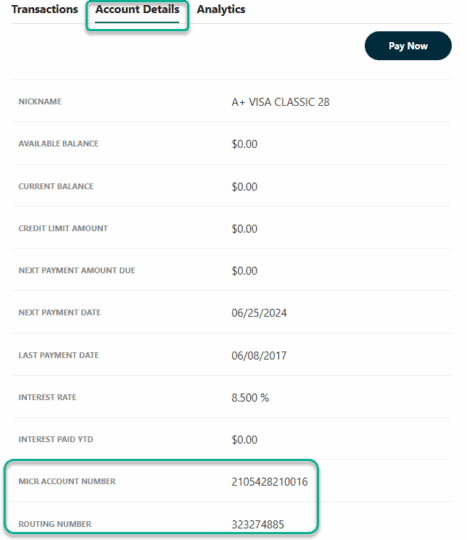
Tip: Your loan account number is different from your member number. Be sure to use the loan account number when setting up payments or transferring funds.
You have multiple ways to find your account and routing number.
From Digital Banking:
Click on the Accounts option from the top of the page, then click on Accounts. Next select the account you want on the left-hand side. Then click on the Account Details tab. Your account number will be at the bottom.
From a check:
Look at the string of numbers along the bottom of one of your checks. The routing number for Embold Credit Union is the first nine numbers on the left.
Your account number is also included in this string of numbers. If you don’t recognize your account number right away, here’s how to find it:
- Circle the first nine digits on the left, so you won’t get our routing number confused with anything else. Also, cross out any special characters.
- Find the check number on the top right-hand corner of the check. Next, locate this number within the string of digits on the bottom, and draw a line through it. There might be a zero before the check number. Cross that out, too.
- Look at the numbers you have left. This is your account number. If you see any zeroes before or after it, please include them as part of your account number.
Need help?
Disclosures
1) Visa does not allow their credit cards to be used for loan payments.
2) For details, see our Truth in Savings document. (https://www.emboldcu.org/wp-content/uploads/2018/02/tis-disclosures.pdf)