



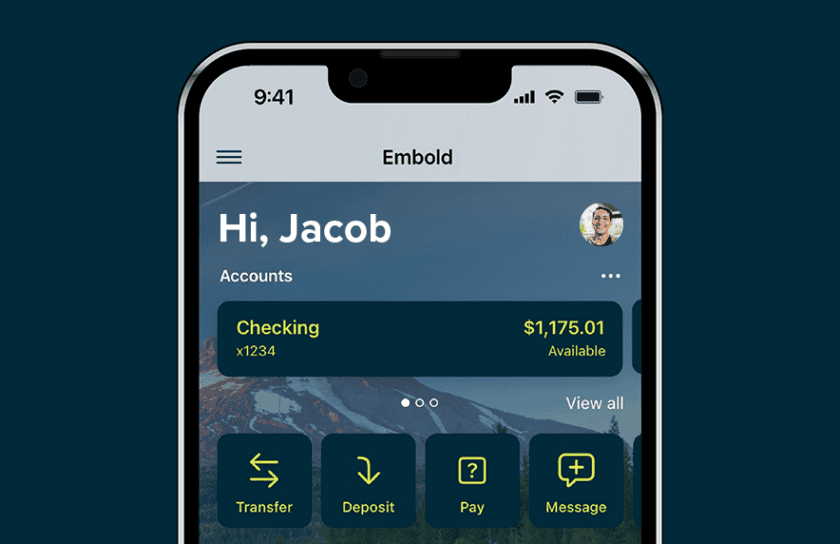
A Better Digital Banking Experience Is Here
Our new Digital Banking experience is now live
We’ve upgraded our Digital Banking platform to bring you a faster, easier, and more secure experience.
What’s New
We’ve upgraded our Digital Banking system to better serve you. This new platform offers an improved user experience, enhanced features, and stronger security—so you can manage your money with confidence anytime, anywhere.
Things to Do
Enroll: Create a username and password. You’ll need your Social Security Number, Member/Account Number, Phone and Email on file.
Reestablish Alerts: Create or set up the alerts you want.
Reestablish External Transfers: Any recurring transfers will need to be set up.
Download the new app: Download the new app from the App Store or Google Play
Our New Digital Banking
Enrollment Process
The Dashboard
Business Banking Admin
Account Recovery
FAQs
- What’s changed with Digital Banking?
- Embold has migrated to an entirely new system for our Digital Banking solution.
- Why did Embold make this change?
- We made this migration to enhance our digital banking offering with new features and enhanced security as well as create a foundation for new functionality in the future.
- Will I need to do anything to re-enroll?
- Have your member number ready (you’ll need this for registration). Not sure what your member number is? Call or text us at 503.656.0671. Please note, if you are the primary owner of the account, use your primary member number. If you are not a primary owner of any account, please use the primary’s member number.
- Will my username and password stay the same?
- During the transition to our new Digital Banking platform, all members will have to re-enroll. As part of this process, you’ll have the option to keep your current username (if available) or choose a new one. You’ll also create a new password that meets the security requirements of the new platform.
- Will I need to re-enroll or register again?
- Yes, all members will need to re-enroll to access Digital Banking.
- Consumer Accounts will have the ability to self-register into the new system.
- Business Accounts will be sent a registration email to the primary business owner.
- Yes, all members will need to re-enroll to access Digital Banking.
- What happens if I forgot my login information?
- No worries! Since you’ll need to enroll in the new system, you’ll be able to create new login credentials. You’ll need to know your member number to enroll in the new system.
- Will there be a new mobile app to download?
- Yes, on September 22 if you search Embold in both the Apple app store and Google play store, you’ll find two apps. The new version will be called “Embold” and NOT “Embold CU”.
- Will the current app stop working?
- Yes, on September 22 the current app will stop functioning.
- Will my fingerprint or Face ID settings carry over?
- Once you download the new app and enroll, you will need to re-enable the settings in the new platform but shouldn’t need to recreate the face ID/fingerprint credentials stored on your Phone.
- Will my account history transfer over?
- Yes
- Will my account numbers change?
- No
- Will my balances and transactions be accurate?
- Yes
- What happened to my scheduled transfers?
- Scheduled transfers will need to be recreated as they are currently stored in our current platform and are unable to be moved.
- Will my recurring bill payments transfer to the new system?
- Yes, payments that are currently established within Bill Pay have transferred over.
- Do I need to re-add payees or payment information?
- No, your Bill Pay payees, payment info, and payment history will migrate over.
- Will the external accounts I’ve added be available
- External accounts will need to be recreated as they are currently stored in our current platform and are unable to be moved. External transfers will not be available for business accounts.
- Will Digital Banking be unavailable during the conversion?
- We don’t anticipate any downtime that would cause access issues. Any potential downtime will be communicated on our website at www.emboldcu.org.
- Bill Pay access will be unavailable September 18th through September 21st. Scheduled transactions will continue to occur, but changes to payees, transactions, and schedules cannot be made during this time.
- How can I access my money during that time?
- Funds will still be accessible using your debit and credit cards, visiting a branch, and calling or texting at 503.656.0671.
- Will my alerts and notifications transfer over?
- No, you’ll need to re-establish alerts and notification preferences.
- Is the new Digital Banking platform secure?
- Yes, the new system has improved security.
- Will there be any changes to how I verify my identity?
- Our new platform includes a variety of ways to confirm identity for multi-factor authentication, including digital passkeys, authenticator apps, and more.
- As always please watch out for imposters. Learn more here.
- What new features are available?
- For our consumer members, you’ll have new features, including:
- A new, customizable dashboard
- You will be able to receive instant person-to-person payments powered by FedNow®
- For our consumer members, you’ll have new features, including:
- Instant transfers using debit cards from other financial institutions (fee based)
-
-
- Users will incur fees on “push-to card” transfers, at 1.75% or a $0.50 minimum per transfer. For “pull-from-card” transfers, end users will incur fees at 0.75% or a $0.50 minimum per transfer.
- Enhanced budgeting tools to manage your finances
-
- What other improvements are there?
- An easier way to toggle between profiles on your mobile device, reducing the number of clicks and the number of times you have to enter your credentials to see all of your accounts.
- Customize your dashboard layout – you will be able to add, move, and remove information tiles so that your dashboard is truly yours.
- Where can I go for help during the conversion?
- You can reach out to the Embold team from within Digital Banking (Conversations), calling or texting us at 503.656.0671, or by visiting a branch. If you are having trouble accessing the new platform and prefer to chat with us, you can do so by starting a conversation from our website.
- Will branches and call center hours change?
- No
QuickBooks and Quicken Users
If you or your business uses QuickBooks® or Quicken® to manage accounts and transactions, action will be required. Please follow the instructions below.